Typing is no longer a secondary skill. It has become a daily requirement for students, professionals, writers, and developers who spend hours on digital devices. A slow or inaccurate typing style often creates frustration, wasted time, and mental fatigue. Over the years, many typing tools have appeared, yet only a few manage to balance simplicity with meaningful progress. The Monkeytype Typing Test has gained attention because it focuses on how people actually learn to type better, not just how fast they can press keys for a few seconds.
Instead of overwhelming users with noise, this platform builds a calm space for improvement. It encourages consistency, awareness, and gradual growth, which makes it suitable for beginners as well as experienced typists. Understanding how it works and why it feels different helps users decide whether it fits their long-term typing goals.
Table of Contents
What Is a Monkeytype Typing Test?
The Monkeytype Typing Test is a web-based typing practice platform designed to measure and improve typing speed, accuracy, and consistency. Its core purpose is to help users develop reliable typing habits through clear feedback and distraction-free practice. Rather than turning typing into a competitive game, it treats typing as a skill that improves with focus and repetition.
This platform exists because many traditional typing websites emphasize speed alone while ignoring accuracy and rhythm. Monkeytype approaches typing as a complete process, where correct keystrokes, stable pacing, and reduced errors matter just as much as words per minute. That balance makes the experience feel realistic and useful in everyday work situations.
For users who type daily, this approach creates steady improvement rather than temporary spikes in performance. Over time, the results reflect genuine progress instead of short-lived speed gains.
How the Monkeytype Typing Test Interface Supports Focus?
The design of the Monkeytype Typing Test plays a major role in how users experience practice sessions. The interface avoids visual clutter and unnecessary elements that often distract users on other platforms. This simplicity allows the brain to focus entirely on typing instead of reacting to pop-ups or advertisements.
Colors, fonts, spacing, and cursor styles can be adjusted to suit personal comfort. These adjustments may seem small, yet they significantly reduce eye strain and hand tension during longer sessions. As a result, users can practice for longer periods without feeling drained. This thoughtful design helps typing feel calm and controlled. When the environment feels stable, improvement becomes easier to sustain.
Performance Metrics Used in Monkeytype Typing Test
The Monkeytype Typing Test evaluates typing performance using multiple metrics rather than relying on speed alone. These measurements provide a clearer understanding of typing habits and weaknesses. Each metric highlights a different aspect of performance, allowing users to improve in a structured way.
Before viewing the metrics, it helps to understand how they work together. Speed shows output, accuracy reflects precision, and consistency reveals rhythm. When combined, these values create a complete picture of typing ability.
| Metric | Meaning |
| Words Per Minute (WPM) | Final typing speed |
| Raw WPM | Speed without corrections |
| Accuracy | Percentage of correct inputs |
| Consistency | Stability of typing rhythm |
| Time | Duration of the session |
These results guide users toward targeted improvement. Someone with high speed but low consistency knows where to focus next. This clarity prevents random practice and saves time.
Practice Modes Available in Monkeytype Typing Test
The monkeytype typing test does not force a single way of practicing. Instead, it offers multiple modes so users can practice according to their comfort and goals. This flexibility keeps typing practice engaging rather than exhausting.
Commonly used modes include:
- Timed mode, which helps build speed under time pressure
- Word count mode, ideal for accuracy and rhythm
- Quote mode, useful for real-world typing flow
- Custom text mode, perfect for exam or job preparation
- Zen mode, which removes time limits and pressure entirely
This variety ensures that typing practice does not feel repetitive and can be adjusted based on daily energy levels.
Who Should Use Monkeytype Typing Test Regularly?
The Monkeytype Typing Test is not limited to competitive typists. Its design makes it useful for a wide range of users who rely on keyboards daily. Students preparing for online exams often benefit from improved speed and reduced typing anxiety. Writers and journalists find that smoother typing flow improves concentration and creativity. Developers and programmers also benefit because consistent typing reduces hand fatigue during long coding sessions.
Office professionals experience fewer errors and faster document completion. Across these groups, the common benefit is reduced friction between thought and execution. This broad usability explains why Monkeytype appeals to both beginners and experienced users. The platform adapts to individual needs without forcing a fixed learning path.
Monkeytype vs Traditional Typing Websites
When compared with older typing platforms, Monkeytype clearly prioritizes learning quality over superficial features. Many traditional sites are cluttered with ads and limited customization, which often interrupts focus.
| Feature | Monkeytype | Traditional Sites |
| Advertisements | None | Frequent |
| Customization | High | Limited |
| Progress tracking | Detailed | Basic |
| Open-source | Yes | Rare |
| Pressure-free practice | Available | Mostly absent |
This difference becomes noticeable after daily use, where Monkeytype feels calmer and more sustainable.
How to Use Monkeytype Typing Test Effectively
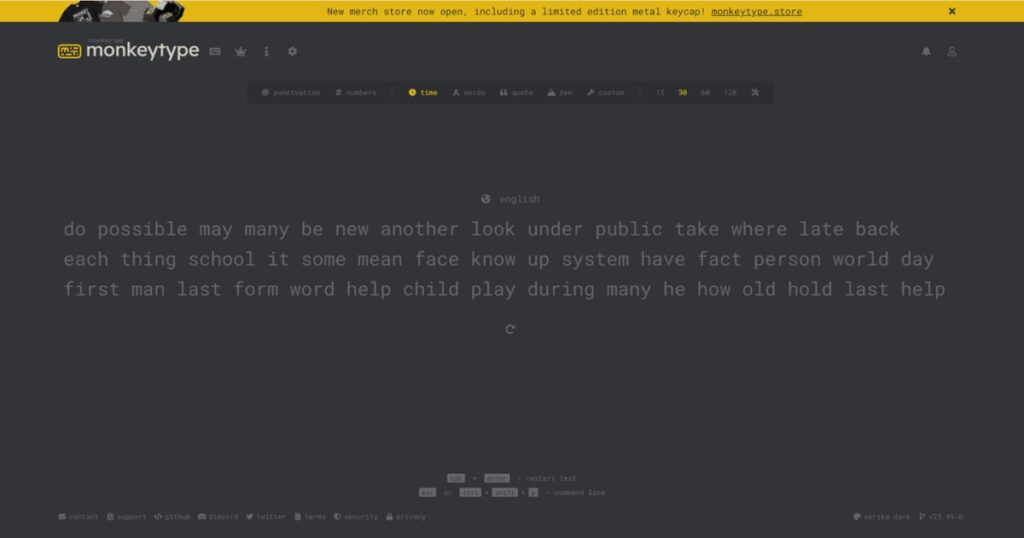
The Monkeytype typing test works best when users approach it with clarity rather than rushing through random tests. By setting the right mode, adjusting preferences, and reviewing results thoughtfully, each session contributes to measurable progress instead of short-lived speed gains.
Step 1: Open the Platform and Get Comfortable
Begin by visiting the official Monkeytype website on a device you regularly use for typing. Make sure your keyboard position, posture, and screen height feel natural before starting. This preparation reduces early fatigue and supports better accuracy during practice.
Step 2: Choose a Practice Mode That Fits Your Goal
Select between time-based sessions or word-count tests depending on your focus. Timed modes help build speed under mild pressure, while word-count modes allow you to concentrate on clean and controlled typing without watching the clock.
Step 3: Adjust Layout, Language, and Visual Settings
Customize the interface by choosing a comfortable theme, readable font, and preferred language set. These adjustments improve visual clarity and reduce distraction, which helps maintain focus during longer typing sessions.
Step 4: Begin Typing With Accuracy as the Priority
Start typing at a pace that allows correct keystrokes rather than rushing. When accuracy improves, speed increases naturally without forcing errors. This approach strengthens muscle memory and builds long-term confidence.
Step 5: Review Performance and Identify Weak Areas
After completing a session, take time to observe speed, accuracy, and consistency metrics. Look for patterns such as repeated mistakes or uneven rhythm, as these insights guide what to focus on next.
Step 6: Practice Daily With Short, Focused Sessions
Consistency matters more than duration when building typing skills. Short daily sessions help reinforce habits while preventing burnout. Over time, steady repetition leads to noticeable improvement.
Monkeytype Typing Test and Its Role in Skill Development
Typing skills improve best when practice feels structured rather than rushed, and this platform was designed with that learning philosophy in mind.
1. Focus on Accuracy Before Speed
Accuracy builds the foundation for sustainable typing improvement, which is why early sessions emphasize correct keystrokes over raw output. When users slow down slightly, they reduce repeated errors that often limit future growth. Over time, this careful approach leads to faster improvement without frustration. The learning curve feels smoother and more controlled.
2. Consistency as a Core Metric
Typing rhythm matters as much as speed, and consistency tracking highlights uneven pacing patterns. Many users type quickly in bursts but lose flow due to hesitation or correction. Monitoring consistency helps stabilize performance across longer sessions. This stability later supports higher speeds with fewer mistakes.
3. Reduction of Cognitive Load
A clean typing environment lowers mental strain during practice. When distractions are removed, attention remains on the keyboard rather than the interface. This mental clarity supports longer practice without fatigue. The result is better focus and reduced burnout.
4. Support for Long-Term Learning
Short-term speed gains fade quickly without structure. This system encourages gradual improvement through repeatable habits. Each session builds on the previous one rather than restarting progress. That continuity strengthens muscle memory naturally.
Why Does the Monkeytype Typing Test Continue to Grow?
The continued popularity of the Monkeytype Typing Test reflects its user-focused philosophy. Community-driven updates ensure the platform evolves based on real feedback. The absence of aggressive monetization keeps the experience respectful and focused.
Online communities share layouts, routines, and improvement stories, which creates organic engagement. This growth feels natural rather than promotional. As a result, Monkeytype remains relevant in a changing digital environment. Its success comes from trust, transparency, and consistent value.
Conclusion:
The Monkeytype Typing Test stands out because it treats typing as a skill that develops through clarity, comfort, and repetition. By combining a clean interface, meaningful metrics, flexible practice modes, and thoughtful customization, it supports genuine improvement rather than short-term results. Over time, users experience smoother typing, reduced fatigue, and increased confidence in daily work. For anyone who types regularly and values steady progress, integrating the Monkeytype Typing Test into a daily routine can quietly transform productivity and focus.
Also Read About: Dolarkit.com – strategic news and policy briefs for Clear Decisions